How long it takes to build a Shopify store
Two stores we built went live in 11 and 12 days, and one catalog took 2. Where the weeks in a Shopify build actually go, and what shortens them.

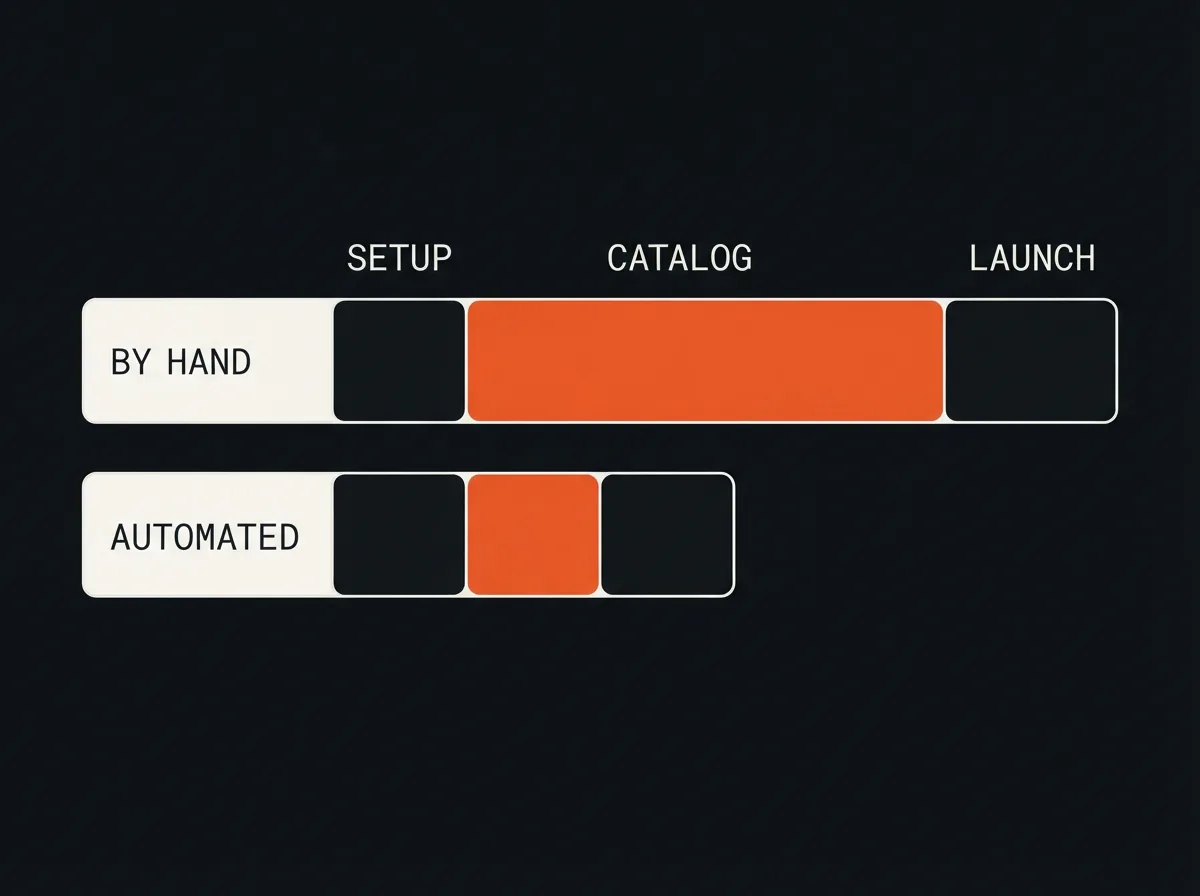
A Shopify store built by hand takes around six weeks for a typical small catalog, and under two weeks when the catalog work is automated. We have measured both ends of that range. The surprise for most owners is where the time goes: the store itself is a few days of work, and the rest is the products.
That matters when you plan a launch, because the usual estimates count the wrong things. Setting up the theme and checkout is predictable. Getting every product listed with its images and details is the part that slips, and it is also the part you can shorten.
Where the six weeks actually go
A standard build has three stretches of work. The first is setup: choosing and configuring a theme, connecting the domain, and setting up payments, shipping zones, taxes, and store policies. On a straightforward store that is a few days. The last is launch: test orders, checking every page on a phone, redirects if you are moving from another platform, and a final pass on the details customers notice.
The middle stretch is the catalog, and it is almost always the longest. Every product needs a title, a description, prices and variants, images, tags, collections, and the search fields that decide how it appears on Google. For a store with a few hundred products, that is weeks of careful, repetitive work before anyone can buy anything.
Why the catalog is the slow part
Catalog work is slow because it multiplies. A few minutes per field does not sound like much until it is multiplied across several fields per product and several hundred products. It is also the work most likely to be waiting on someone else: product details sit in a supplier's spreadsheet, photos have not been shot, and prices are still being decided.
It is where quality slips too. The first twenty listings get careful attention and the last two hundred get copied and pasted. When we started with Wall Nest, a home décor store with a catalog in the hundreds of SKUs, a full catalog refresh took roughly six weeks by hand, and the descriptions were inconsistent and rarely written for how people actually search.
What the faster builds did differently
The stores that went live quickly did not skip steps. They moved the repetitive catalog work from people to software and kept people on the decisions. For Wall Nest we built an agent that drafts on-brand listings, formats them, and uploads the products with their images, with a person reviewing the output. The full catalog went live in two days instead of six weeks.
Henna Jamila, a beauty brand moving its catalog online for the first time, started with product information that was scattered and inconsistent. An AI-assisted build structured it into a clean catalog, and the full store was live in 11 days against roughly six weeks by hand. Fragrance Hub went live in 12 days, with sales reporting wired in from the start rather than bolted on after launch.
What does not get faster
Some of the timeline belongs to the owner, and no tool changes it. Decisions on branding, pricing, shipping rates, and return policies take as long as they take. Product photography has to happen in the physical world. Payment providers and some product categories need verification that runs on someone else's schedule. A fast build plans around these rather than pretending they are not there.
The honest way to read a fast timeline is that the controllable work was compressed. If the photos are not shot and the prices are not set, an automated catalog just gets you to the waiting part sooner.
What quietly adds weeks
A few things reliably stretch a Shopify timeline. Migrating from another platform adds work mapping old products, customers, and URLs so existing search traffic is not lost. A fully custom theme takes far longer than configuring a good existing one, and it is rarely what a new store needs. Stacking apps adds conflicts and slows the storefront, which then needs its own clean-up. The most common delay of all is content arriving late: the build is ready and the product data is not.
How to plan your own build
Get the product data into one spreadsheet before the build starts: names, prices, variants, sizes, materials, and anything a customer would ask. Shoot or collect the photos early. Decide shipping and returns in week one, not the week before launch. Then treat the catalog as its own workstream, because that is where the calendar is won or lost.
If your catalog is large or changes often, automate the listing work rather than hiring more hands to type it. Our guide to writing product descriptions with AI in bulk covers how that works without breaking the catalog. And if you are still weighing who should build the store, the trade-offs are in a comparison of freelancers, agencies, and in-house developers.
What a realistic timeline looks like
For a small store with its product data ready, plan on two weeks with automated catalog work and around six by hand. Add time for a migration, a custom theme, or products that need regulatory checks. Put reporting in from the start so you can see what sells in the first week rather than the first quarter. That is how we sequence web and ecommerce builds, and it is why the store is usually the fast part.
Questions
Can a Shopify store be built in a week?
The setup can, but a full catalog rarely can by hand. With product data already organised and listing work automated, a small store can be live in under two weeks. Our fastest full builds took 11 and 12 days.
What takes the longest when building a Shopify store?
The catalog. Setting up the theme, payments, and shipping is a few days of work, while writing and uploading every product with its images and details takes weeks for a catalog of a few hundred items.
What should I prepare before a Shopify store build starts?
Put all product data in one spreadsheet, collect or shoot the product photos, and decide shipping rates and return policies. Content that arrives late is the most common reason a Shopify launch slips.
Who should build your Shopify store depends less on the hourly rate than on who owns and runs it after launch. A plain comparison, written by an agency.
Generating product copy is the easy part. Getting hundreds of listings written, checked, and uploaded without breaking the catalog is the real job.
The weekly sales spreadsheet is one of the most common manual jobs in a small store. What the report should contain, and how to build one that stays correct.